This document was written by John Gourlay for people who might be interested in the design of a solar energy system with backup, for future owners of the Gourlay house, and as an aid to his own memory.
Anticipating the End of Net Metering
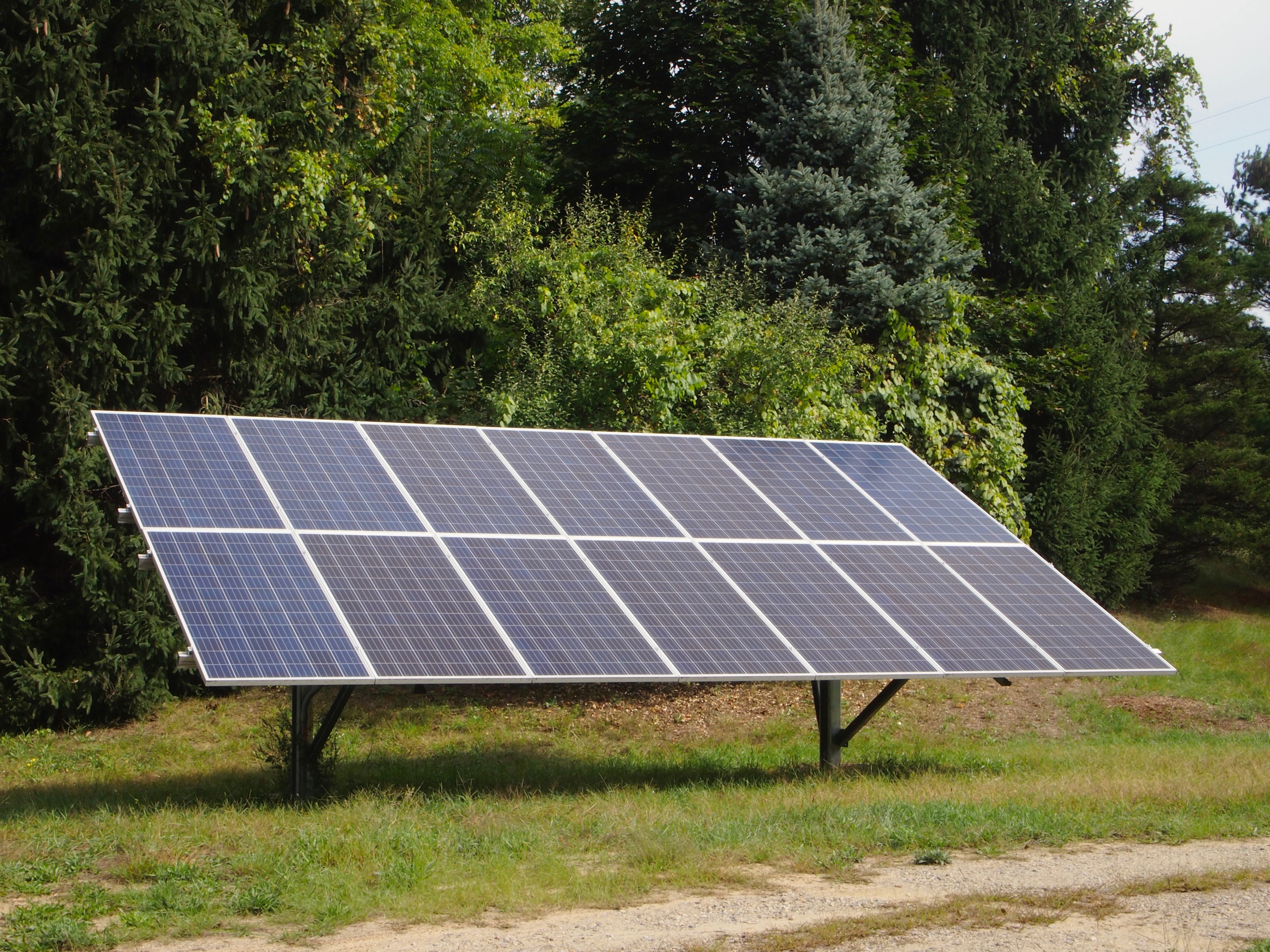
The Gourlay residence has a solar electric system that was installed by Homeland Solar in March, 2018. It's a grid-tied system with battery backup, meaning that it will sell excess solar power to the electric utility (DTE Energy), it will power the house with utility power when the solar power is insufficient, and it will power the house from batteries when the utility power from the electric utility fails. Rather than being roof-mounted, the solar array is ground-mounted on a high point on the property close to the house with very little shading. The remaining components of the system, the inverter, charge controllers, and batteries, are installed in the basement of the house.
The system is designed to provide all of the energy needed by the house in an average year except for heating. (The house has a geothermal heating system with its own, separate electric meter that is unconnected to the solar system.) During the summer the solar system generates more electrical energy than the house uses, and this energy is recorded as a credit on the electric bill. In the winter the solar system generates less than the house uses, and the credits that accumulated in the summer are drawn down so that ideally the energy balance goes to zero at the end of the year. The electric service is billed using "net metering" so that electrical energy is bought and sold at the same price. The actual electric bill is never actually zero, however, because of fixed service charges.
The system also keeps a bank of batteries charged which provide power to the house when the utility power fails. The battery backup cannot power the whole house, however. It only powers six "critical" circuits, including the refrigerator, the well pump, and important lighting circuits. When the utility power fails the battery backup switches on automatically. The critical circuits see no interruption of power, although the remaining circuits in the house do go dark including the geothermal heat. The house has a wood stove that can keep the house warm during an extended winter power failure.
Click on any of the images on this page to enlarge them.
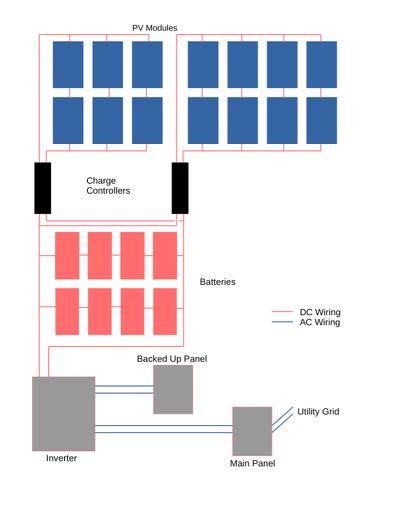
The solar array consists of fourteen 320W modules (Jinko Solar JKM320PP-72-V) for a nominal total of 4.48kW of power. The modules are mounted in a 7 by 2 array on a Unirac Ground Fixed Tilt rack at a tilt of 30°. Electrically, the vertical pairs of modules are connected in series. Then, the west three pairs of modules are connected in parallel, and separately the east four pairs are also connected in parallel. This wiring is done in a combiner box attached to the rack. The individual modules operate at about 35V and a pair in series operates at about 70V, so the west, three-pair group can deliver about 1.9kW at 27A and the east, 4-pair group can deliver 2.6kW at 37A. Cables carry the power from these two groups underground and into the basement of the house. (There's a review of Jinko solar panels on the website of an Australian solar installer, Lightning Solar. The review was written long after the decision to buy the panels, but it's interesting to see that it gives the brand high praise.)
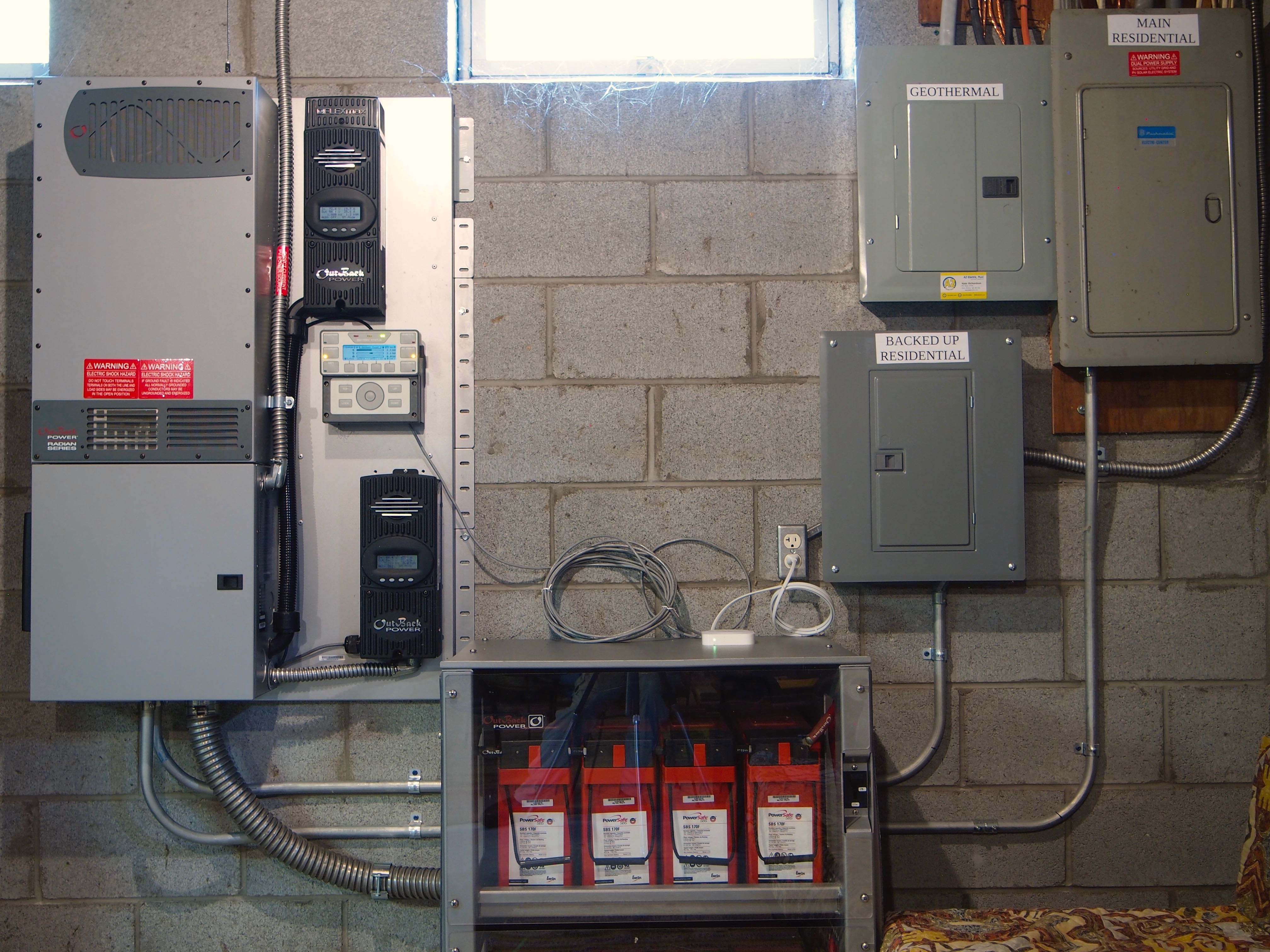
The remaining components of the solar energy system are on the wall of the basement near the electric service distribution panels. Most of the electronic components are manufactured by Outback Power. From left to right, the top half of the large gray box contains the inverter (GS4048A). The bottom half of this box is a junction and switch panel (GSLC175PV1-120/240) through which all the other components are connected. This panel also contains a battery monitor (FLEXnet DC). The two black boxes to the right of the inverter box are charge controllers (a FM80-150VDC above and a FM60-150VDC below). Between the charge controllers is the system display (MATE3s), which also serves as a gateway between the other components and as an internet device. On the floor is a large box containing the batteries. The white device on top of the battery box is a wifi bridge. To the right and above the batteries are three distribution panels: One contains circuit breakers for the critical, backed-up circuits. A second panel contains breakers for the rest of the residential circuits, the ones that are not backed up during a utility power failure. The third panel contains breakers for the geothermal heating and cooling system, which is unconnected to the solar system.
After entering the house the two power lines from the solar array go through the junction panel to the charge controllers. The power from the three-pair (west) module group goes to the lower, FM60 charge controller and the power from the four-pair (east) module group goes to the upper, FM80 charge controller. The charge controllers use maximum power point tracking to obtain the most power possible from the array. They then deliver the power to the batteries, converting the array voltage to the optimum voltage for charging the batteries.
The battery bank consists of eight 12V AGM lead-acid batteries (EnergyCell 200GH) wired as two parallel strings of four batteries to operate at a nominal 48V. Individually the batteries are rated to deliver 200Ah at 12V in a slow, full discharge, so the bank could deliver 400Ah at 48V, or about 19kWh. Like all lead-acid batteries, however, they shouldn't be discharged deeply. Assuming a maximum of 50% discharge, the batteries should be able to deliver 9.6kWh before being recharged.
The batteries deliver DC power to the inverter which generates 240V AC. This AC output, in turn, is connected to the backed-up residential panel. If the utility power is working the AC output also goes to the main residential panel and any power not used by the house is sold to the utility. If the utility power fails the inverter breaks the connection to the main residential panel (and the utility grid) automatically with no interruption in the power to the backed-up circuits. The inverter also contains an AC battery charger that can, if necessary, charge the batteries from the utility power.
The battery monitor watches the battery voltage and the currents going into and out of the battery. From this information and an estimate of losses in the battery, the monitor continuously computes the battery's state of charge. It displays the state of charge with lights visible in the inverter panel.
The MATE3s system display performs a variety of functions. Its default display shows the amount of solar power being produced, the amount being used by the critical circuits, and the amount of excess going to the main residential panel. It also shows the battery state of charge and voltage, the utility voltage, etc. Other display modes show the status of each of the system components, performance and error logs, and system configuration parameters. The system configuration can be changed from the system display, and it can be saved and loaded using a removable flash memory card. Finally, the system display connects to the internet through the wifi bridge. By this route the system's performance and configuration are accessible with a user id and password through the Outback web site opticsre.com.
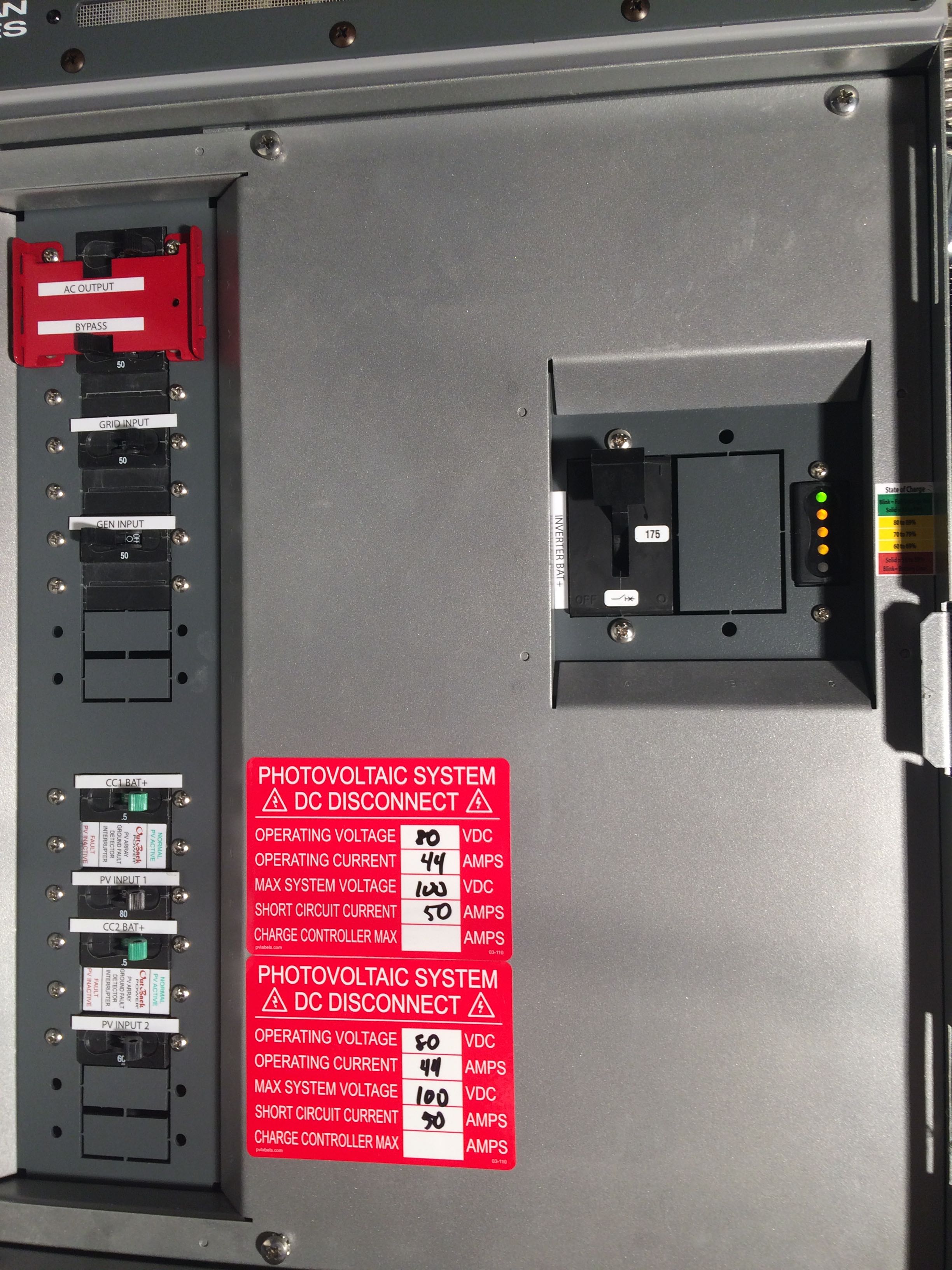
The junction and switch panel contains, in addition to the battery monitor state-of-charge lights, switches that connect or disconnect system components. Here are the functions of the switches by name:
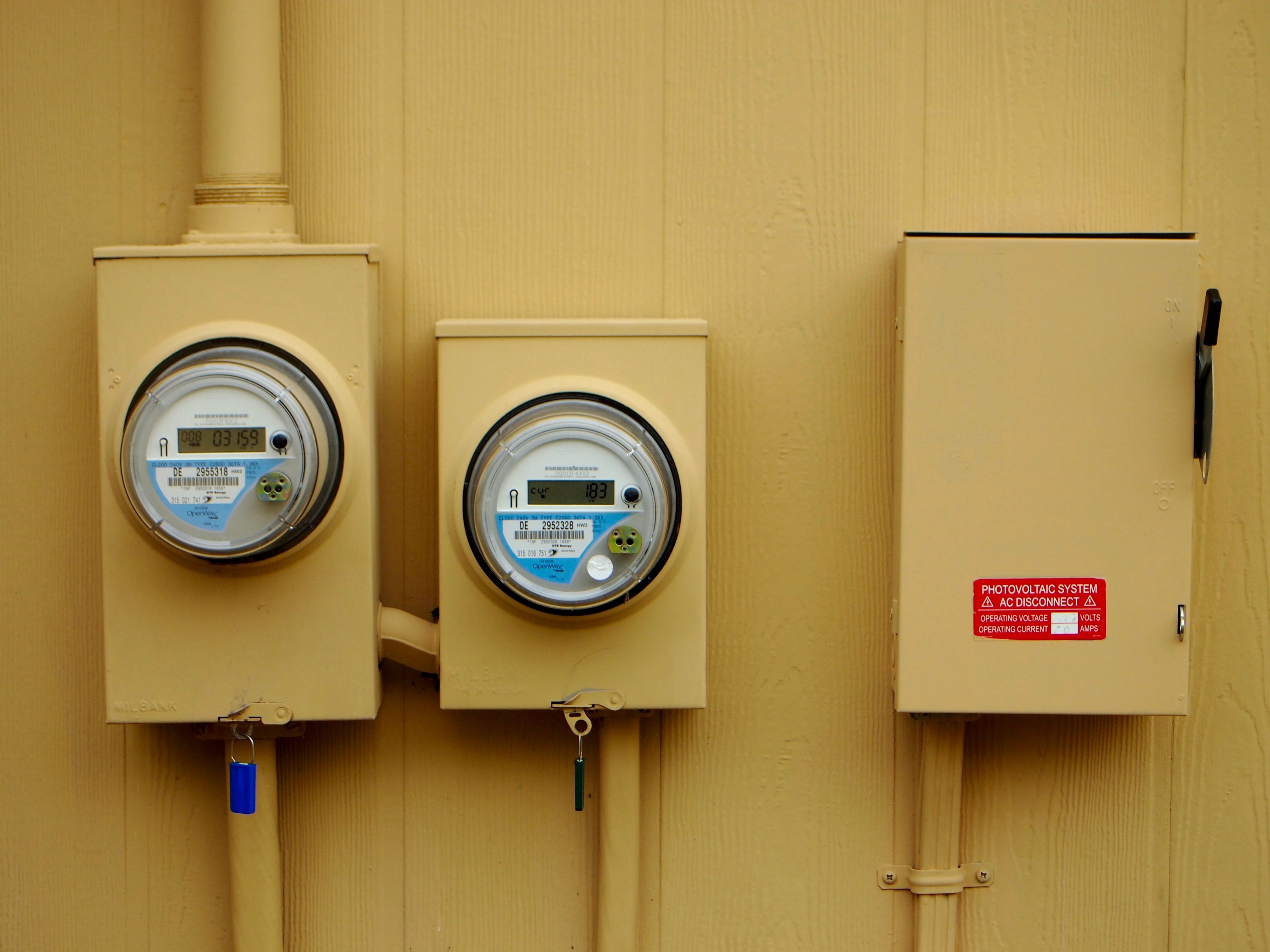
On the outside, north wall of the house are two DTE electric meters. The meter on the left is the meter for the residential service, and the one on the right is the meter for the geothermal service. To the right of the meters is a switch that can be used to disconnect the solar energy system from the utility grid. This does not shut off the solar system which will continue to power the backed-up circuits inside the house. This shut-off is required by the electric utility. With it they can be sure that the solar system is disconnected from the grid even if there is an equipment failure within the house.
The residential meter cycles through several different displays. Of particular interest are the displays labeled "cur" which shows the power being sold (negative) or bought (positive) at the moment, "4" which shows the total energy bought since the solar energy system was initialized in March, 2018, and "8" which shows the total energy sold. Note that the amount of power being sold according the meter will always be less than the amount shown by the basement system display because of power consumed by the circuits in the main residential panel (the circuits that are not backed up).
Three tools were very helpful in the design process. One was the online PVWatts Calculator at pvwatts.nrel.gov which estimates the amount of solar energy that can be obtained at a site based on its location, array size and tilt, etc. The second was an iPhone application Sun Surveyor that uses the phone's camera and its location and orientation to display an augmented reality view of where the sun will be in the sky at any time throughout the year. This helped to visualize when shading would occur at various potential locations for the solar array. The third tool was a device available from DTE called an Energy Bridge which connects wirelessly to the electric meter and collects and displays minute-by-minute power consumption. This was useful for estimating the daily energy used by the well pump, refrigerator, etc.
Two considerations heavily influenced the design of the Gourlays' solar energy system. First, utility power at the house has been very unreliable, with a few brief outages each month and a few long outages, sometimes days long, each year. The opportunity to get reliable power was worth a lot. Second, the utility's grid interconnection rules require annual solar energy production to be no more than the house uses historically.
This second consideration was important because the house has geothermal heating powered through a separate meter from the rest of the residential uses. The two electric services were billed at different rates, on average $.16/kWh for residential electricity vs. $.10/kWh for geothermal electricity at the time the solar system was designed. At that time the geothermal system required about 7000 kWh annually and the other residential uses required 3000kWh anually. It turns out that a solar array that produces only 3000kWh annually is too small to maintain an adequate backup for the house.
A minimal backup system had to include the well pump, refrigerator, and a few lighting circuits for lights in a few places in the house, computers, and internet service. This was estimated to require 4–6 kWh daily. To provide backup during the worst winter weather for 2 days there should be batteries that can deliver about 8kWh. And, in order to refill the batteries during a very long utility power outage in the winter, the solar array should be able to deliver about the same amount of energy on an average day in December.
One way to satisfy DTE would have been to combine the residential and geothermal circuits under one meter with an annual energy usage of 10,000kWh, but all electricity bought through this meter wouild be billed at the much higher residential rate. A solar system large enough to provide all this energy would be too expensive, and any smaller system would be economically unjustifiable.
A better solution turned out to be to move an electric water heater circuit from the geothermal panel to the residental panel adding an additional annual energy requirement to the residential meter. The installed 4.48kW solar array is acceptable under these conditions, and it is predicted to generate the needed 8kWh/day in December. (In fact the system has been producing an average of 5.6 kWh per day in December, slightly lower than intended.) As an aside, the water in the heater is preheated by the geothermal system when it runs, and it runs primarily in the winter. So, the electric resistance elements in the water heater require energy primarily in the summer when solar energy is plentiful.
A decision that must be made for every solar installation is whether to mount the solar array on a roof or on the ground. The Gourlays' house has a large south-facing roof that initially seems like the right choice, but several issues worked against it. First, ground-mounted modules away from the insulating roof operate at a lower temperature and therefore produce more power. Second, a ground-mounted array can be cleared of snow, but a roof mount generally can't. Third, the roof in this case has a tilt of 20° and a ground mount can be built with a more productive tilt. (See more below.) Finally, a roof mount would experience significant shading in December, something that would be normally overlooked because little energy is produced in December even without shading. The requirement for backup, however, makes December energy production much more important than in conventional grid-tied systems.
Conventional wisdom says the correct tilt for a solar array equals the latitude, 42.4° in this case. The actual optimum tilt for energy production at this latitude, however, is about 30° because the sun is above the horizon much more during the summer and it make sense to tilt the array to get the most use out of the summer sun. A 45° tilt gives 1% less annual energy but 9% more energy in December. However, a 45° rack requires a custom, more expensive installation, with four foundations rather than two and a more industrial look. In this case an off-the-shelf 30° rack was chosen as a compromise.
Once all of these parameters of the solar energy system were defined there were two easily available equipment manufacturers to choose from: SolarEdge or Outback Power. The Outback system was more expensive, but it was chosen anyhow for three reasons. One was that Outback is an American company and buying from them presumably offers the economic and environmental advantages that go with buying locally. Another reason was that the Outback equipment is much more flexible than the SolarEdge equipment. For example, Outback allows for many different modes of operation, grid-tied, grid-zero, and off-grid, for example. Also, Outback allows for many different battery chemistries. This led to the third reason for choosing Outback, which was that SolarEdge offered only one battery option, an LGChem lithium-ion battery. This battery uses the same chemistry as cell phones and laptops that had recently caught fire. Although the chances of a fire were small, there hadn't been much, if any, experience with these batteries over the 20-year period they were expected to last. So, an Outback system with lead-acid, AGM batteries was chosen.
The cost of a solar energy system with backup battery storage is much higher than one without, so much so that solar installers typically steer customers away from batteries. Consider, however, what the Gourlays get from the solar backup system, and what a similar backup might cost separate from the solar system.
A whole-house backup generator that starts up automatically when the utility power fails would cost thousands of dollars. Such generators typically require roughly ten seconds to start up and generate power for the house, so they really don't prevent power failures, they just make them shorter. The solar backup system, on the other hand, switches to battery power instantly and seamlessly, and when the utility power fails computers, appliances, and lights simply keep running as if nothing changed. A backup generator with this capability would cost thousands of dollars more.
A good way to judge the cost of a solar energy system with backup, therefore, is to subtract the many thousand dollar cost of this hypothetical, separate backup generator from the cost of the full solar installation, leaving the cost of the solar system without backup. Doing this arithmetic for the Gourlay installation gives a system cost of about 2.44$/W, a very economical system.
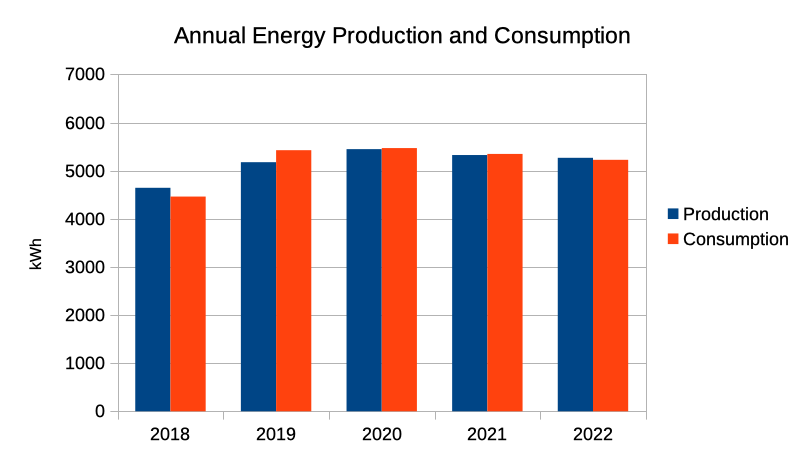
As can be seen below in charts covering the five years 2018–2022, the solar energy system has been producing almost exactly the same amount of energy as the residential service has consumed. This is what was intended, but it is a bit surprising that production and consumption are so close. As was explained above, a water heater was moved from the geothermal service to the residential service without a precise idea of how much energy the water heater would consume. It worked out just right.
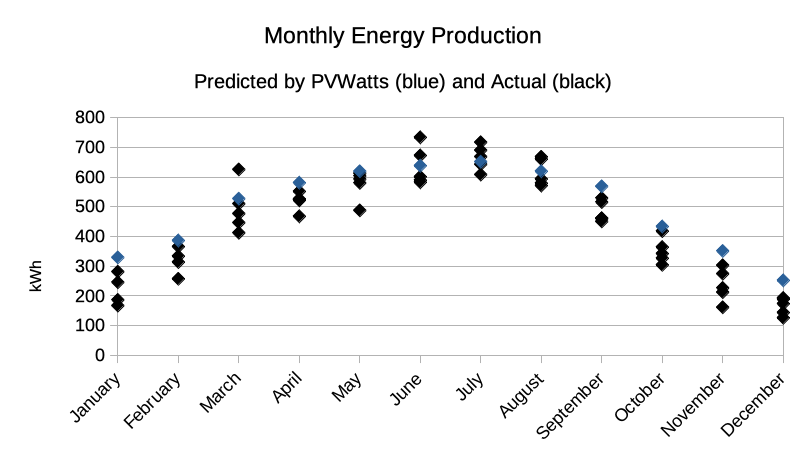
The system's actual energy production has been somewhat less overall than was predicted by the PVWatts calculator. The average annual production over the five years from 2018 through 2022 was 90% of the PVWatts prediction. The monthly production varies a lot from year to year, but only in June, July, and August is production frequently more than predicted. Production in the other months is lower than predicted, particularly in the darkest months of winter. This winter deficit might be due to trees on the horizon reducing production when the sun is low in the sky, affecting production proportionally more during the winter months.
Since the installation of the system there have been numerous utility power outages, and the battery backup feature of the system has worked flawlessly. Unlike using a generator backup there is no interruption to the power in the house when the utility power goes down, and the Gourlays have been unaware on several occasions that the utility power has failed until the power is restored and they hear their microwave oven beep. The microwave is on a circuit that is not backed up, so it does experience the power failure.
One notable power outage started on August 11, 2021 and lasted more than three days. During this outage the battery state of charge fell to about 90% overnight each night, and returned to fully charged by about 11 am the next morning. Of course, this power outage occurred during the summer, with long days and short nights, but the minimal drop in battery charge and the quick recovery makes it appear that there will be no problem when there is a similar event in the winter.
Over the 58 months of operation during the years 2018–2022 it can be estimated that the system has saved the Gourlays about 40% of the initial cost of the system (less the cost of the backup capability; see Cost above). If this rate of savings continues the system will have paid for itself after about 12 years of operation.
Under "net metering" a utility charges the customer the same amount as they pay them for each kilowatt hour consumed or produced. This is the current billing scheme for the Gourlays's solar system, and the "grid tied" mode of operation of the Outback inverter handles this appropriately. Recently, however, DTE Energy has been allowed to change to a "distributed generation tariff", where the utility charges significantly more for electricity consumed as they pay for electricity produced. The Gourlays are grandfathered in net metering for a total of ten years, and the distributed generation tariff will take effect in 2028. Under that billing scheme it will be valuable for the system to consume as much electricity as possible locally—not sell electricity during the day only to buy it back at night.
Using the Outback inverter it is possible to drain the batteries some each night and then recharge them with solar energy the next morning. This can be done roughly with these MATE3s settings:
First, turn off the inverter charger so that the batteries are never charged from the grid. To do this press the Charger hot key, then press the Charger Mode soft key. There set the charger mode to off.
Second, disconnect from the grid for a period of time during the night each night, maybe for the hours of darkness in the summer. To do this, in the settings menu choose MATE3s Settings and find the Grid Use Time setting. Set appropriate Drop and Use times and then enable the feature.
[http://weathervanefarm.net/solar; last updated March 23, 2023.]